আসসালামুআলাইকুম...
প্রিয় পাঠকবৃন্দ আপনারা আমার এই ব্লগটি সম্পর্কে আপনারা সবাই অবগত আছেন। আমি সাধারণত এই ব্লগ টা লিখি আপনাদের বিভিন্ন সফ্টওয়ারের সাথে পরিচয় করে দিতে এবং অনলাইন থেকে কিছু অর্থ উপার্জন করার জন্য জানি না আমার এই সাইট টা আপনাদের কত টুকু সাহায্য করে। যাই হোক আজ আমি আপনাদের একটি সাইট এর সাথে পরিচয় করিয়ে দিব যেখানে আপনি আপনার চাহিদা অনুযায়ী অনেক কিছু শিখতে পারবেন যেমন ওয়েব ডেভলপমেন্ট, মোবাইল এবং কম্পিউটার প্রোগ্রামিং আরও অনেক কিছু। আসলে অনলাইন থেকে বেশি কিছু আয় করতে হলে আপনাকেও কিছু জানতে হবে, আর এই জানার জন্য আপনি বাংলা ভাষাতে উন্মুক্ত শিক্ষার আসর / http://bangla.salearningschool.com/ এই সাইটে যেতে পারেন এটা একটি বাংলা ভাষাতে শিক্ষার আসর । আশা করি আপনার কাজে লাগবে। ধন্যবাদ
বৃহস্পতিবার, ১২ মার্চ, ২০১৫
বুধবার, ১১ মার্চ, ২০১৫
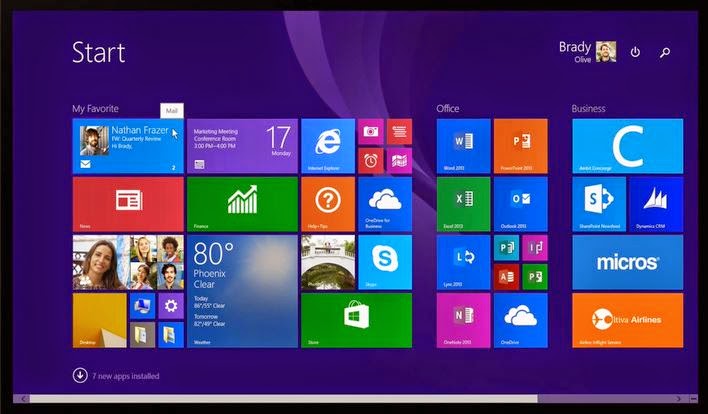
Windows 8.1 Features
Microsoft has already released the equivalent of a first Service Pack for windows 8 to Windows 8.1, Update 1.
The latter should already have landed automatically on Windows 8 systems via Windows Update; you need to have Windows 8.1 already installed beforehand.
Facebook to the full-featured Mail app and modern Outlook, a "peek" bar in the modern version of Internet Explorer 11 and the new Windows Scan app, you get all of the Windows 8.1 extras what were teased in early 2013.
Start button is back and you can use the same image for your Start screen as your desktop background.
SkyDrive online data store is built in to sync files - on both Windows 8.1 and Windows 8.1 RT - as well as settings and the layout for your Start screen and as desktop taskbar.
But Microsoft's second bite at the convergence of PCs and tablets doesn't back away from what we still want to call Metro; in fact, there are more built-in modern apps than in Windows 8, more settings you can change without jumping to the desktop and more options for how you position modern apps on screen.
The question is how well these two platforms sit together, and how much of an improvement. If you already have Windows 8, upgrading to Windows 8.1 is very simple. It will be the first app you see every time you open the Windows Store and the installation happens very quickly.
You don't have to install again your desktop applications or your Windows Store apps, and all your files are still there (as are libraries and the icons pinned to your taskbar).
If you sign in with a Microsoft account you haven't used before, you might have to use a code that Microsoft emails or texts to you (if you've set that up in the past) to confirm it's you; that works like trusting a PC in Windows 8 but you don't have to do it as a separate step.
If you have Windows 7 (seven) or earlier versions, you have to install Windows 8 (the same process as when Windows 8 first came out) and then upgrade to Windows 8.1.
If you've been trying the Windows 8.1 Preview, you can't upgrade directly to the RTM version. If you can't revert to Windows 8, you still do the update from the Windows Store and your files will stay on the system, but you'll have to reinstall your desktop programs.
The latter should already have landed automatically on Windows 8 systems via Windows Update; you need to have Windows 8.1 already installed beforehand.
Facebook to the full-featured Mail app and modern Outlook, a "peek" bar in the modern version of Internet Explorer 11 and the new Windows Scan app, you get all of the Windows 8.1 extras what were teased in early 2013.
Start button is back and you can use the same image for your Start screen as your desktop background.
SkyDrive online data store is built in to sync files - on both Windows 8.1 and Windows 8.1 RT - as well as settings and the layout for your Start screen and as desktop taskbar.
But Microsoft's second bite at the convergence of PCs and tablets doesn't back away from what we still want to call Metro; in fact, there are more built-in modern apps than in Windows 8, more settings you can change without jumping to the desktop and more options for how you position modern apps on screen.
The question is how well these two platforms sit together, and how much of an improvement. If you already have Windows 8, upgrading to Windows 8.1 is very simple. It will be the first app you see every time you open the Windows Store and the installation happens very quickly.
You don't have to install again your desktop applications or your Windows Store apps, and all your files are still there (as are libraries and the icons pinned to your taskbar).
If you sign in with a Microsoft account you haven't used before, you might have to use a code that Microsoft emails or texts to you (if you've set that up in the past) to confirm it's you; that works like trusting a PC in Windows 8 but you don't have to do it as a separate step.
If you have Windows 7 (seven) or earlier versions, you have to install Windows 8 (the same process as when Windows 8 first came out) and then upgrade to Windows 8.1.
If you've been trying the Windows 8.1 Preview, you can't upgrade directly to the RTM version. If you can't revert to Windows 8, you still do the update from the Windows Store and your files will stay on the system, but you'll have to reinstall your desktop programs.
To know more.....click below the link
সোমবার, ৯ মার্চ, ২০১৫
GP FREE live TV in 0.0 MB internet- Gtv, RTV, Channel I, Desh TV Totally Free in GP SIM- গ্রামীনফোন থেকে উপভোগ করুন Totally ফ্রি !!!!!!!!!!!!!!!
Install VLC Media Player. Connect your Modem with default Internet settings. Take any 3G Pack. Open VLC Media Player. Now go to Media>Open Network stream> (and paste this url for Gtv without any space)rtsp://10.165.58.54:1935/live/wc7?TOKEN=GP1403970610487
Then> play.
Link of Free GTV, RTV, Channel I, Desh TV in GP Sim. Try yourself..
GTV -> rtsp://10.165.58.54:1935/live/wc7?TOKEN=GP1403970610487
RTV -> rtsp://10.165.58.54:1935/live/wc3?TOKEN=GP1403970610487
Channel I -> rtsp://10.165.58.54:1935/live/wc1?TOKEN=GP1403970610487
Desh TV -> rtsp://10.165.58.54:1935/live/wc4?TOKEN=GP1403970610487
GTV -> rtsp://10.165.58.54:1935/live/wc7?TOKEN=GP1403970610487
RTV -> rtsp://10.165.58.54:1935/live/wc3?TOKEN=GP1403970610487
Channel I -> rtsp://10.165.58.54:1935/live/wc1?TOKEN=GP1403970610487
Desh TV -> rtsp://10.165.58.54:1935/live/wc4?TOKEN=GP1403970610487
If you find it helpful then don’t forget to comment.
Find me in Facebook.
শুক্রবার, ৬ মার্চ, ২০১৫
Play Online Casino
It is Online casinos which is also known as virtual casinos or Internet casinos, are online versions of traditional ("brick and mortar") casinos. It enables gamblers to play and wager on casino games through the Internet.
Online casino generally offer odds and payback percentages that are equal to land-based casinos. Some online casinos claim higher payback percentages for slot mechanism games, and some circulate payout percentage audits on their websites. Assuming that the online casino is using an appropriately programmed casual number generator, table games like blackjack have an established house edge. The payout percentage for these games are established by the rules of the game.
বৃহস্পতিবার, ২৬ ফেব্রুয়ারি, ২০১৫
Play Online Casino
It is Online casinos which is also known as virtual casinos or
Internet casinos, are online versions of traditional ("brick and
mortar") casinos. It enables gamblers to play and wager on casino games
through the Internet.
Online
casino generally offer odds and payback percentages that are equal to
land-based casinos. Some online casinos claim higher payback percentages for
slot mechanism games, and some circulate payout percentage audits on their
websites. Assuming that the online casino is using an appropriately programmed
casual number generator, table games like blackjack have an established house
edge. The payout percentage for these games are established by the rules of the
game.
Online
casino generally offer odds and payback percentages that are equal to
land-based casinos. Some online casinos claim higher payback percentages for
slot mechanism games, and some circulate payout percentage audits on their
websites. Assuming that the online casino is using an appropriately programmed
casual number generator, table games like blackjack have an established house
edge. The payout percentage for these games are established by the rules of the
game.
সোমবার, ২১ জুলাই, ২০১৪
Download: Pufi-by Humayun Ahmed-only 5 MB in size/ ডাউনলোড: পুফি-হুমায়য়ুন আহমেদ-মাত্র ৫ মেগাবাইট
Pufi is an
outstanding novel written by Humayun Ahmed, a famous novelist of Bangladesh.
From Here you can download it. Only 5 MB
in size.
পুফি- বাংলাদেশী ঔপন্যাসিক
হুমায়ুন আহমেদ রচিত একটি বিখ্যাত উপন্যাস। আপনারা এটি এখান থেকে ডাউনলোড করতে পারেন । পিডিএফ ফাইলটির সাইজ মাত্র ৫ মেগাবাইট ।
If you find it helpful then don’t forget to comment.
Find me in Facebook.
বুধবার, ১৬ জুলাই, ২০১৪
Download:: Sanchita - by- Kazi Naztul Islam ডাউনলোড:: সঞ্চিতা- কাজী নজরুল ইসলাম
Sanchita is a famous
poetic book composed by our national poet Kazi Nazrul Islam. From here you can
download it. Only 4 MB PDF file in size.
"সঞ্চিতা"- আমাদের জাতীয় কবি কাজী নজরুল ইসলামে একটি বিখ্যাত কাব্য গ্রন্থ। আপনারা এটি এখান থেকে ডাউনলোড করতে পারেন। পিডিএফ ফাইলটির সাইজ মাত্র ৪ মেগাবাইট।
If you find it helpful then don’t forget to comment.
Find me in Facebook.
এতে সদস্যতা:
পোস্টগুলি (Atom)